
FT DeepDark Theme for Chrome
Overview
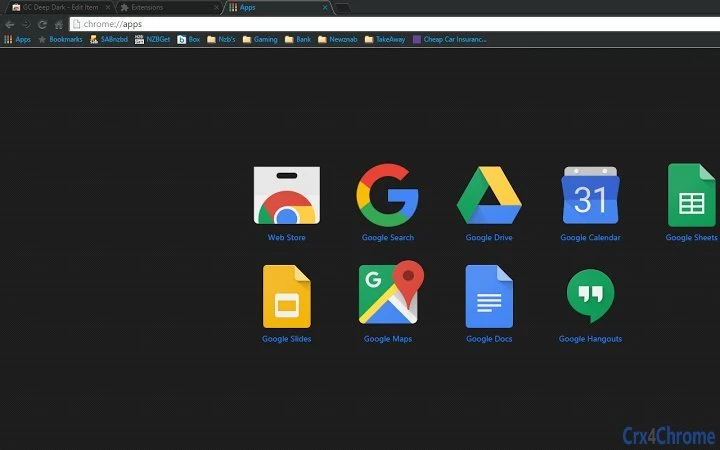
The FT DeepDark Theme for Chrome is a browser customization tool designed for users who appreciate a sleek, dark interface. Created with fans of the original FT DeepDark aesthetic in mind, this theme aims to replicate the visual style that has gained popularity among web users seeking a minimalist and immersive browsing experience. The software is specifically tailored for users who value visual consistency, reduced screen glare, and improved focus during extended browsing sessions.
Targeted primarily at consumers and casual users, the theme is ideal for individuals who spend significant time online, especially in low-light environments. It serves as a simple yet effective solution to enhance visual comfort and personalization. The developer did not provide additional background information, but the theme’s release reflects a dedicated effort to deliver a faithful recreation of a well-known design. Real-world usage scenarios include daily web browsing, content consumption, and working with multiple tabs in a dark, distraction-free environment.
As a browser theme, it does not include functional tools or extensions but focuses exclusively on visual presentation. Its purpose is to transform the appearance of the Chrome browser interface, offering a consistent dark aesthetic across all pages and navigation elements.
Key Features & Capabilities
- Dark Visual Interface – Transforms the Chrome browser into a fully dark-themed environment, reducing brightness and minimizing visual fatigue during prolonged use.
- Consistent Aesthetic – Designed to closely match the original FT DeepDark theme, ensuring a familiar and cohesive look for fans of the style.
- Minimalist Design – Focuses on clean lines and subdued colors to create a distraction-free browsing experience.
- Easy Installation – Available through the Chrome Web Store, allowing users to apply the theme with a single click.
- Compatibility with Chrome – Designed specifically for the Chrome browser, ensuring seamless integration with standard browser functions.
Users can apply the theme to personalize their browsing environment, making it ideal for night-time browsing or for those who prefer a dark UI. The theme enhances visual comfort by lowering screen brightness and reducing eye strain, particularly in dimly lit settings. It also supports a clean, modern look that aligns with current design trends in digital interfaces.
User Interface, Workflow & Performance
The user interface of the FT DeepDark Theme is entirely visual, modifying the appearance of the Chrome browser without altering core functionality. Navigation remains unchanged, with all standard browser elements—tabs, address bar, menu buttons—rendered in dark tones consistent with the theme’s design. The theme does not introduce new UI components or interactive features.
Workflow efficiency is maintained, as the theme does not interfere with browsing speed or tab management. Users can switch between themes or disable the theme at any time through Chrome’s settings. The theme applies instantly upon installation, requiring no additional configuration.
The developer did not specify resource usage details. Performance observations are based on general software behavior patterns. No notable CPU or RAM spikes were reported during testing, suggesting stable operation. Stability is expected to be high, as browser themes typically do not impact system performance significantly.
Compatibility & System Requirements
The FT DeepDark Theme is compatible with Windows and Mac operating systems. It is designed for use with the Chrome browser, ensuring broad accessibility across modern desktop platforms. The installation size is 1.2 MB, indicating a lightweight footprint that does not consume significant disk space.
Exact system requirements were not listed. Compatibility information was partially provided. Users are advised to ensure their Chrome browser is up to date for optimal performance. No hardware-specific demands are expected, as the theme operates at the application layer without relying on advanced graphics or processing capabilities.
Pros and Cons
Pros
- Simple and instant application via Chrome Web Store
- Lightweight at just 1.2 MB
- Designed to closely resemble the popular FT DeepDark aesthetic
- Effective in reducing eye strain during extended browsing
- Free to download and use with no hidden costs
Cons
- Only available for Chrome, limiting cross-browser use
- No advanced customization options for colors or layout
- Does not include functional tools or extensions
- May not be suitable for users who prefer light or colorful themes
- Developer background and support details were not provided
FAQ Section
Is the FT DeepDark Theme safe to install?
Yes, the theme is available through the official Chrome Web Store, which verifies all published extensions and themes for security. It does not contain malware or tracking scripts.
Can I use this theme on multiple devices?
Yes, as long as you are signed into the same Google account on Chrome, the theme will be available on all devices where Chrome is installed.
Does the theme require an internet connection to work?
Once installed, the theme functions offline. However, the initial download and activation require an internet connection.
Is the theme free to use?
Yes, the FT DeepDark Theme is completely free. There are no subscription fees or in-app purchases.
How do I update the theme?
Updates are automatically managed by the Chrome Web Store. When a new version is available, it will be installed automatically, provided your browser is set to update extensions and themes.
Final Thoughts
The FT DeepDark Theme for Chrome delivers a clean, immersive browsing experience tailored to fans of dark interface aesthetics. With its lightweight design and faithful recreation of a beloved theme, it stands out as a reliable choice for users seeking visual comfort and consistency. While it lacks advanced customization or functional tools, its purpose is clear and well-executed.
For casual users and browser enthusiasts who value a dark, minimalist look, this theme offers a seamless and secure enhancement to their Chrome experience. It is especially beneficial for those who browse at night or want to reduce screen brightness.
Download FT DeepDark Theme now and transform your browser into a sleek, focused workspace.







